RBW, Stateful Staging, Atomic Writes, and Green Gates
How AiStudio generates dependable code through deterministic rails.
Most AI coding systems fail for the same reason: they treat code like chat.
They patch fragments, rely on conversational memory, and write into stale context.
The result is unpredictable, fragile, and often destructive.
AiStudio avoids this entirely through four hard rails:
- RBW (Read Before Write) — always inspect reality before touching it
- Stateful staging area — a scratchpad where many tool calls converge into one coherent change
- Atomic writes — full‑file, deterministic replacements using a reversible file‑swap protocol
- Green gates — every landing path is a real build, and only green builds can land
These rails turn a stream of tool calls into stable, shippable engineering.
Why naive patching fails
Most AI systems rely on:
- partial diffs
- inline patches
- optimistic edits
- stale conversational state
This leads to:
- broken files
- missing imports
- inconsistent state
- silent regressions
- unreviewable changes
The model “thinks” it changed one thing, but the repo tells a different story.
AiStudio’s rails eliminate this entire class of failure.
RBW: Read Before Write
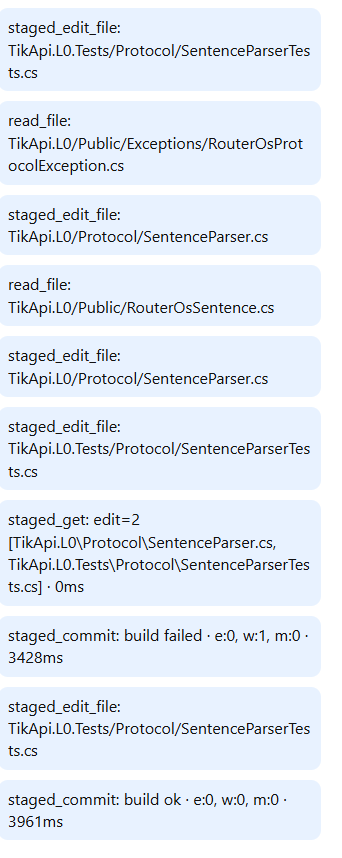
RBW is the first and most important gate:
No write is allowed before a fresh read.
The Programmer must:
- inspect the code tree
- open the relevant files
- understand the current state
Only then can it propose a change.
Why RBW matters
Without RBW, the model writes against stale assumptions.
With RBW, every change starts from reality, not memory.
RBW prevents:
- reintroducing fixed bugs
- overwriting recent changes
- hallucinating structure
- breaking working code
It is the foundation of deterministic behavior.
The stateful staging area
The Programmer never writes directly into the repo.
It works inside a stateful staging area — its scratchpad.
A single “step” often involves 30–50+ tool calls:
- reading multiple files
- exploring the tree
- drafting new versions
- refining structure
- adjusting names and seams
All of this happens in staging.
What staging provides
- isolation from the committed repo
- a coherent view of the upcoming change
- the ability to refine full files repeatedly
- a safe place to iterate without risk
The staging area is where the code becomes what it should be.
Atomic writes (with reversible file‑swap protocol)
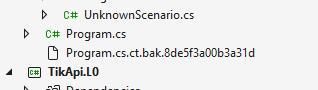
When the Programmer is satisfied with the staged files, it performs an atomic commit.
This is not a patch. It is a transactional file‑swap.
How an atomic commit works
Identify all staged files
These are the full files prepared in staging.Backup existing files
Any file that already exists on disk is renamed to a backup.
Nothing is overwritten.Write the staged files into the repo
The new versions replace the originals.Run MSBuild against the new state
This is the green gate.
The build must be completely clean:
no errors, no warnings, no messages.If the build is green
- Backups are deleted
- The commit becomes permanent
- Staging is cleared
If the build fails
- New files are removed
- Backups are restored
- Nothing lands
- Programmer returns to staging to correct the issue
Why this matters
This protocol guarantees:
- no partial commits
- no broken intermediate states
- no accidental overwrites
- no repo corruption
- no “half‑applied” changes
Atomic writes are not just a discipline — they are a mechanical safeguard.
Green gates
Atomic writes ensure file‑level correctness.
Green gates ensure system‑level correctness.
A green gate is a hard rule:
No staged change is committed unless the build is clean.
Clean means:
- no errors
- no warnings
- no messages
The build system becomes the arbiter of truth.
Why gates matter
Green gates prevent:
- broken commits
- cascading failures
- silent regressions
- architectural drift
Every commit is known‑good.
Every step is stable.
Small, green, observable steps
These rails work best with a disciplined rhythm:
- 1–6 files per step
- < 200 LOC per file
- strict SOC boundaries
- many tool calls per step, but one coherent staged change
- summary + next‑step plan after each step
ObserverView shows:
- tree reads
- file reads
- staged edits
- build results
- commit attempts
This makes the entire process transparent and easy to supervise.
Why this works
- RBW keeps the model aligned with reality
- Staging gives it a safe workspace for complex changes
- Atomic writes prevent partial or inconsistent edits
- Green gates block broken or noisy commits
- Small steps keep context clean and progress reviewable
- Visibility makes every action inspectable
The result is not “AI that sometimes writes good code,”
but a repeatable, deterministic way for an LLM to behave like a careful engineer.
Quick checklist
- RBW: tree and files read before any edit
- All edits happen in a stateful staging area
- Only full files are staged — no patches
- Build runs against staged state before commit
- Only green builds can land; failures land nothing
- Steps are small, summarized, and easy to continue with a single “next”